LEX3891-2QF
100GBASE-R to 100GBASE-R media converter
The LEX3891-2QF is an Ethernet OAM-compatible media converter equipped with Link OAM/CFM OAM functions.
It is the world's smallest*1 Ethernet OAM-compatible media converter.
100G is ideal for building a variety of networks, including data centers, carrier-to-carrier communications, and campus networks.
-
● The world's smallest-class chassis
●Available as a standalone unit. Also available as an integrated chassis (LEX3020/LEX3004).*Notes 1, 2, 3
● In-band monitoring: Monitors the status of adjacent line cards using Link OAM (IEEE802.3ah).
●Compliant with IEEE802.3ba/bm (100GBASE-R) standards
●Auto Laser Shutdown (shuts down Tx optical signal in case of fiber disconnection)
●Supports FEC (Forward Error Correction) functionality
●Supports Jumbo Frames
●Supports transparent transmission of BPDU, EAPOL, and LACP
●Settings can be changed using DIP switches (for standalone use)
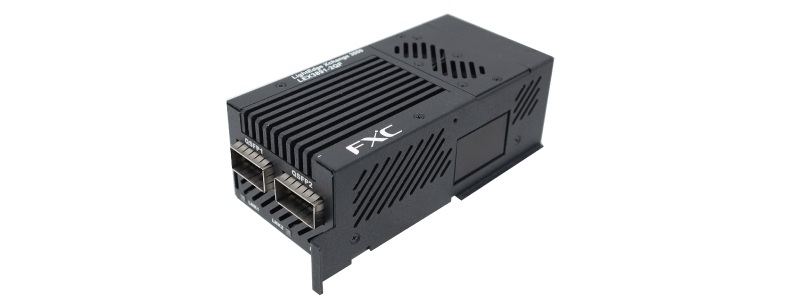
LEX3891-2QF

Spec
| Models | LEX3891-2QF | |
| Standards | IEEE802.3ba/bm(100GBase-R4) | |
| Transmission speed | 100Gbps | |
| Fiber ports | Number of SFP ports | QSFP28 x 2 ports, SFF-8661/8679 (MSA) |
| Transmission mode | Switching mode | |
| Maximum frame size | 12,288 byte | |
| MAC address | 16,384 | |
| Communication function | link fault pass through (Default: OFF) EAP/BPDU/LACP transparent. | |
| FEC stands for Forward Error | ||
| Correction. | ||
| Flow Control | IEEE802.3x (full duplex) | |
| Latency | 1.5μs | |
| Rated input voltage/frequency | AC90~240V、DC12V±5% 50/60Hz | |
| Maximum heat output | 3A | |
| Maximum power consumption (including 2 x QSFP) |
32 W (when QSFP-100G-ZR4 and QSFP-100G-LR4 are installed on each port) | |
| Maximum heat output (including QSFP x2) |
27.53kcal/h (when QSFP-100G-ZR4 and QSFP-100G-LR4 are installed on each port) | |
| AC adapter dimensions | Main unit | 62 × 30 × 65mm |
| Cable length | 1m | |
| Jack Long | 11.0mm | |
| AC adapter weight | 211g | |
| Environmental conditions | Operating Temperature/Humidity |
0℃ ~ 40℃ / 0% ~ 95%(no condensation) |
| Storage Temperature/Humidity |
-25℃ ~ 70℃ / 0% ~ 95% (no condensation) | |
| Dimensions | 55 × 110 ×40.5mm without detachable parts |
|
| Weight (body only) | 330g | |
| Compliance standards | EMI Standards | EMI VCCI Class B, FCC Class B |
| Environmental Standards | RoHS compliant (10 substances) | |
| Safety standards | PSE | |
| Reliability | MTBF: 189,832(h) (at room temperature of 25℃ *excluding QSFP) |
|
| Accessories | AC adapter x 1 Installation guide & warranty x 1 Cable tie to prevent adapter cord from coming loose x 1 Rubber feet x 1 set (4 pieces) Magnet x 1 Magnet mounting screw x 1 PD board mounting bracket x 1 PD board mounting bracket body connection screws x 2 PD board mounting bracket connection screws x 2 L-shaped DC conversion plug x 1 |
|
| name | situation | setting | explanation |
| SW1 | Up (OFF) | Built-in ROM setting priority mode |
If you want to prioritize DIP when using it alone, make sure to turn it ON. |
| Down (ON) | DIP setting priority mode | ||
| SW2 | Up | Both ports LinkOAM enabled | If disabled, in-band management will not be possible (OAM frames will be transmitted when disabled). |
| Down | LinkOAM disabled on both ports | ||
| SW3 | Up | - | - |
| Down | |||
| SW4 | Up | LFP1 disabled | SFP2 is shut off when SFP1 is disconnected |
| Down | LFP1 enabled | ||
| SW5 | Up | LFP2 disabled | SFP1 is shut off when SFP2 is disconnected |
| Down | LFP2 enabled | ||
| SW6 | Up | - | - |
| Down | |||
| SW7 | Up | Port 1 FEC disabled | - |
| Down | Port 1 FEC enabled | ||
| SW8 | Up | Port 2 FEC disabled | - |
| Down | Port 2 FEC enabled |
Note 1) The following combinations cannot be used: - 2 QSFP-100G-ZR4 installed at the same time - 2 QSFP-100G-ER4 installed at the same time - QSFP-100G-ZR4 and ER4 installed at the same time Note 2) Up to one unit can be installed in the LEX3004 Note 3) When installing LEX3891-2QF in LEX3020, please install it with one slot left next to it (Installation in 19-20 slots is possible).
■DIP Switch Specifications
| name | situation | setting | explanation |
| SW1 | Up (OFF) | Built-in ROM setting priority mode |
If you want to prioritize DIP when using it alone, make sure to turn it ON. |
| Down (ON) | DIP setting priority mode | ||
| SW2 | Up | Both ports LinkOAM enabled | If disabled, in-band management will not be possible (OAM frames will be transmitted when disabled). |
| Down | LinkOAM disabled on both ports | ||
| SW3 | Up | - | - |
| Down | |||
| SW4 | Up | LFP1 disabled | SFP2 is shut off when SFP1 is disconnected |
| Down | LFP1 enabled | ||
| SW5 | Up | LFP2 disabled | SFP1 is shut off when SFP2 is disconnected |
| Down | LFP2 enabled | ||
| SW6 | Up | - | - |
| Down | |||
| SW7 | Up | Port 1 FEC disabled | - |
| Down | Port 1 FEC enabled | ||
| SW8 | Up | Port 2 FEC disabled | - |
| Down | Port 2 FEC enabled |
■LED
| LNK/SPD (2 pieces) |
optical port link Status/speed information display |
- | lights out | Link not established 100GBASE-R link establishment |
| green | lit | 100GBASE-R link establishment | ||
| green | blinking | Communicating | ||
| Red | Slow flashing (1 second cycle) | Signal Detect | ||
| green/orange | Slow flashing (1 second cycle) | LFP is shutting off | ||
■LED(At startup)
| Start condition | Startup LED color | lighting pattern | |
| name | color | ||
| DIP priority mode | LINK/SPD | orange | All LEDs on (about 15 seconds) → |
| 2 LEDs off → Normal operation | |||
| PWR | green | always on | |
| Built-in ROM priority mode |
LINK/SPD | orange | Two LEDs flash alternately (about 2 laps per second) → All LED lights on (about 15 seconds) → 2 LEDs off → Normal operation |
| PWR | green | always on | |
■LED(When updating firmware)
| LED name | lighting pattern |
| PWR | Always green |
| LINK/SPD (right) | Always green |
| LINK/SPD (left) | Rotation lighting, repeating green → orange → red at a cycle of about 1 second |